Showing posts with label nerdstuff. Show all posts

24 April, 2012

NAS for iSCSI/media/files

1.8TB SATA3 in RAID-1 configuration.

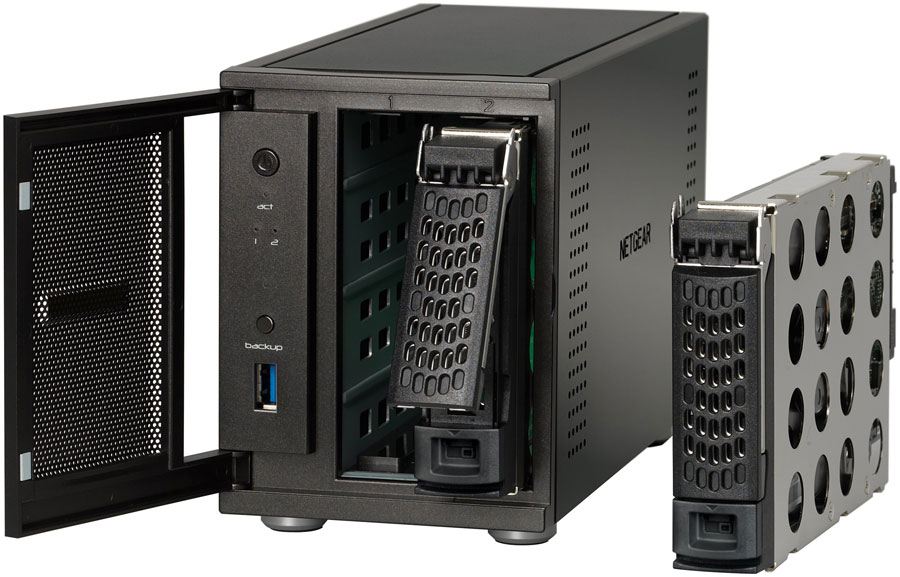
I have now switched my ReadyNAS Duo v2 with a ReadyNAS Ultra 2 Plus, which is the business-edition of Netgear's 2-bay NAS boxes. Way better equipped for my needs.

Hardware:

  • Intel Atom dual-core 1.5GHz (x86 instead of arm5 as in Duo v2)
  • Dual Gigabit RJ-45 LAN ports
  • 2 x USB 3.0 on back-panel (one over each gigabit LAN port)
  • 1 x USB 3.0 on front-cover (for "backup"-button)
Accessories:
  • 2 x Western Digital Caviar "Green" 2TB SATA3 hard-drives

The Ultra 2 Plus business-ready revision of the dual-bay NAS from Netgear offers more advanced configuration and customization options, and also complies with Linux networking protocols (NFS, SSH, SFTP, etc.), unlike the Duo v2 which only offers AFP and SMB file-sharing (Apple and Windows network file-sharing respectively) and basic configuration.

What really makes it stand out is its ability to share iSCSI targets. Basically, it can share portions of its RAID-array as virtual hard-drives for Virtual Machines run either by for example VMware or VirtualBox on a server, or via a bare-metal hypervisor (ex.VMware ESXi, my personal favorite ;).

Extra functions in the Ultra 2 Plus compared to Duo v2, are for example the possibility for scheduled RAID-scrubbing and/or volume checking, to keep your RAID volumes clean and fixed :)

13 November, 2009

40 years of Multics

Multics, the ancestral system that coined the computer-term 'time-sharing' and heavily influenced the development of today's computer systems. The catalyst for Unix and later similar POSIX-like systems.

Multics was never really widely used, like Unix, and thus never got the public recognition like Unix and Linux did, mainly because it was a hardcore research/educational system (much like Plan9 from Bell Labs) and the fact that the Internet was not yet conceived (to spread the code, like Linux-communities does today).

Multics was developed in the 60s by computer science professors at M.I.T.

It was the first --OFFICIAL-- system to incorporate the concepts of time-sharing (of which the ITS was the pioneer) and high-level programming. It's main programming language --PL/I, "Programming Language One"-- was intended for non-assembly-savvy developers, and was as such, the first high-level programming language ever used(!).

In accordance with other university-policies in later years, the Multics-project released Multics codebase as open-source in November of 2007. This spurred the creation of the online "Multicians" project (link at bottom of post), who's members where eager Multics users that wanted to elaborate and collaborate on their favourite system online (much like Linux has since 1992-3).

Link:

21 April, 2009

OS X utsatt for botnet-orm


Nå er det i hvert fall ikke trygt å bruke Mac lenger...

Mac / Apple har siden 70-tallet vært trendsetter på data-markedet, så det var ikke et spørsmål om "hvordan" eller "hvis", men "når". Visste det bare var et tidsspørsmål. Og det har jeg sagt lenge, så lenge det finnes en merkbar markedsandel med folk som bruker visse typer systemer, vil disse da bli mål for cyber-kriminelle (crackere).

Botnets har lenge vært et problem med Windows-maskiner. Mac-folket har lenge ment at noe tilsvarende ikke kan skje med deres maskiner. Dels fordi de er en minoritet få virusmakere gidder å bry seg med, og dels på grunn av at Apples operativsystem OS X er bygget på Unix - en plattform som av mange regnes som sikrere enn Microsofts.


En nedlastbar fiks fra Apple, kalt "iWorksServices Trojan Removal Tool", kan hentes ned herfra.

For å videre beskytte Mac- / Apple-maskiner fra slike trusler, bør en installere anti-virus og evt. anti-spionvare programmer (og her gjelder KISS-prinsippet, mer enn ETT anti-virus eller anti-spionvare program på samme maskin byr på mer problemer enn nytte).

17 April, 2009

Nysatsingen på åpen kildekode


Da ser det ut som det blir Bergensområdet som først får benyttet alle de vidunderlige åpne kildekode-prosjektene som finnes rundt om i verden, i et offentlig samarbeid "for åpne standarder i offentlig sektor" (som ble nevnt tidligere i en-eller-annen artikkel/offentlig dokumentasjon).

Nytt kraftsenter på åpen kildekode - digi.no : Bedriftsteknologi
Bergen kommune, it-ekspertene Avenir, Høgskolen i Bergen (HiB), Universitetet i Bergen (UiB) og lokale it-miljøer går sammen for å gjøre Bergen til et kraftsenter for utnyttelse av åpen kildekode i utviklingen av fremtidens it-løsninger.

Initiativet understøtter både Regjeringens satsing på økt bruk av fri programvare og ønsket om styrket samhandling mellom offentlig og privat sektor.

Gartner spår at innen 2012 vil 80 prosent av alle it-løsninger inneholde elementer av åpen kildekode. De fastslår at virksomheter som velger å ignorere denne utviklingen, automatisk vil stille seg to skritt bak konkurrerende virksomheter.

Bergen Kommune, Avenir, HiB, UiB, og store lokale it-miljøer som DnB Nor, NextGenTel og EDB Business Partner ønsker å ligge i forkant i utnyttelsen av åpen kildekode.

26 March, 2009

OS/2 lives on :)

The oldschool types never really die, they update and evolve ;) The 90's operating system: OS/2, was a development collaboration between Microsoft and IBM, to introduce the 2nd generation operating system to accompany IBM's second generation personal computers of the early 90's. Today you would assume the OS was long since dead and forgotten.., well, you'd be wrong.

OS/2 lives on to this day, and is represented by Serenity Systems as "eComStation 2.0 RC6a" (2 pictures below).


What I liked about OS/2 was it's clean intuitive interface :) It even had pseudo-3D games! (chessboard in picture below)


From wikipedia.org:

Future

There is a community of OS/2 users and developers, along with loyal company customers, hoping that IBM will release OS/2 or a significant part of it as open source. Petitions to that end were made in 2005 and 2007, but IBM declined, citing legal, technical and strategic reasons.[35] It is unlikely that the entire OS will be open at some point in the future, because it contains third-party code, much of it from Microsoft.

Also IBM made a deal with Commodore to license Amiga technology for OS/2 2.0 and above in exchange for the REXX scripting language.[36] This means OS/2 may have code not written by IBM, which can prevent the OS from being open-sourced in the future.[37][38]

Version 2.0 had such a long design cycle that its design started while OS/2 1.1 was still under development, and thus, portions of it were developed in conjunction with Microsoft, even though Microsoft never released a branded version of 2.0 (although they did release a beta in their name). IBM's contribution to versions 1.2 and earlier mostly resides in the GUI components; however, bug fixes and substantial performance changes to the entire system in 1.3 were made by IBM, and much more of the overall system (including the kernel) for 2.0 was developed by IBM.

The aborted PowerPC port did not involve Microsoft at all, and has been proposed as the basis for an open-source 64-bit version of OS/2.

Still, the community has suggested that, even if only the IBM portion of it is made open, the missing parts could be written by the same community to form a next-generation version of the OS. Code could perhaps be integrated from the Wine or ReactOS projects. Many developers believe that these missing parts include many of the legacy 16-bit components not revised since OS/2 1.x, and are exactly the parts that should be rewritten anyway. There is an ongoing petition to open parts of the OS arranged by OS2World.com.[39]

With the possibility of an open-source future for OS/2, the OS may be given a new lease of life. IBM's current and heavy involvement with several open source projects indicate that opening parts of OS/2 will not be difficult for the company. But until then, OS/2's future remains in limbo.

Open source operating systems such as Linux have already profited from OS/2 indirectly through IBM's release of the improved JFS file system which was ported from the OS/2 code base.

OS/2 programs will eventually use emulators and compatibility layers for running programs dedicated for OS/2.

25 March, 2009

Asus 900 PC w/10hrs battery ;P

Hehe, my Asus Eee 900 PC with the 7,4V 10,4Ah battery case

(mildly oversized if you ask me, as shown in the 2nd picture below ↵)


A personal note about modifying this machine:

I cannot believe how easy it was to replace the RAM-module in this netbook! In contrast to the Acer Aspire One (AAO), this netbook was kids-play to open, remove the original RAM-module, and successfully replace with an upgrade.

Two screws opens an access hatch on the underside, which in turn gives access to both the single RAM-module and the miniPCI-express wireless card contained within ;) Both of which are not particularly wear resistant. So it was a blessing to be able to do this task in right under 5mins without having to dismantle the whole machine (as with the Acer Aspire One) to further risk electrostatic damage and so fourth...

I didn't really like Asus all that much before...but now, I LOVE Asus ;]

Among other nice features, it took my Huawei 220 3G USB modem out-of-the-box! No driver compilation, no additional kernel module...nothing. Just 'Plug-And-Play' ;P sweet!

10 March, 2009

Choosing the right flavour...

A lot of Linux enthusiasts argue/claim that Slackware Linux is an outdated and obsolete Linux distro.


Fair enough, if compared to more modern bleeding-edge distributions like Ubuntu, SuSe, Gentoo and the like.

Allthough Slackware is a vanilla-distro (little or no changes/patches to system packages what-so-ever), it can be TWEAKED to include whatever you'd like. It is one of the last "hands-on" distributions out there. ANYTHING can be hacked/tweaked to suit any needs.

Slack forces the user to learn Linux from the ground up, and by this learning-curve, makes the user able to do whatever on whatever distribution in question. However, there are custom-distro's that focuses on specific user-scenarios: Ubuntu serves as a good "out-of-the-box" operating system for "gnubies", Fedora is Red Hat-based and serves as a rock-solid server framework or a good place to start as a sysadmin, SuSe is very good at security and Gentoo for compilation-wizards and optimization-gurus.

But since Slackware is the oldschool-type, it is basically barebones.., it is the base, and it works!

Patrick Volkerding is the maintainer and "BDFL" of Slackware Linux.

The three S' o' Slack:
  • Simplicity
  • Stability
  • Security

24 October, 2008

"An idiot's view of open source"


blogs.bomputerworld.com skrev:

"...Keen, forfatteren av boken, 'Cult of the Amateur: How the Internet is killing our culture', argumenterer at 'En av de veldig få positive konsekvensene av den pågående finansielle smittsomheten vil være et skarpt kulturelt skifte i vår holdning mot den økonomiske verdien av vårt arbeid. Storbredt arbeidsløshet og en dyp økonomisk nedgangsperiode inbefatter den mest effektive motgiften mot de utopiske idealene til åpen kildekode radikalene.'

Og p.g.a. dette vil 'Historikere se tilbake på åpen kildekode manien mellom 2000 og 2008 med en miks av skepsis og fornøyelse. Hvordan kunne tusenvis av folk donert bort deres kunnskaper til Wikipedia eller blogosfæren gratis? Hva var det med Internett som gjorde så mange av oss irrasjonelle om vår økonomiske verdt?'

Problemet med dette argumentet er enkelt: det er et 'strå-mann argument'. Det finnes nesten ingen åpen kildekode radikaler, og av deer det meget få (hvis noen i det hele tatt) som jobber gratis.

Hvem som helst som virkelig følger åpen kildekode utviklingen vet at majoriteten av koden som blir bidratt er skrevet av betalte profesjonelle utviklere. Som ofte påpekt tidligere i artikler på nett, er det mest populære åpen kildekode prosjektet, Linux, skrevet av industri-Amerika.

I Linux kjerne versjon 2.6.24, for eksempel, vet vi at, minst, 74.2% er skrevet av betalte utviklere. Vi kan til og med koke det ned så langt at vi kan navngi de ti øverste på utviklingslisten, i rekkefølge: Red Hat 11.2%; Novell 8.9%; IBM 8.3%; Intel 4.1%; Linux Foundation 2.6%; uavhengige linux konsulenter 2.5%; SGI 2.0%; MIPS Technology 1.6%; Oracle 1.3% og MontaVista 1.2% med Google følgende etter mot toppen av topp ti med 1.1%.

Utviklerne i disse selskapene jobber ikke gratis, og aksjeholderne deres forventer å se en sunn profitt. Nå, finnes et ideal her. Er ikke sikker på om jeg ville kalt det "Utopisk" da. Jeg ville kalt det ytterst pragmatisk og praktisk. Hovedidéen i åpen kildekode og dens noe heller radikale forgjenger 'free software' (gratis programvare), er at det er bedre å dele informasjon enn å låse det inn i proprietær mykvare (software).Eller, for å sette det i lys på en måte de fleste vil forstå, i stedenfor å prøve å spise en liten kake hel, den proprietære fremgangen, mener åpen kildekode utviklere at det er bedre å lage en større, bedre kake slik at alles stykker blir like store. Dette er ikke en form for 'pie-in-the-sky' idé. Det virker.Linux Foundation slapp nettopp en studie som viste at Linux-varianten 'Fedora Core 9' ville ha kostet, i form av konvensjonell utviklingskostnad, rett i overkant av 11.75 billioner dollars. Den kombinerte markeds-korken, i denne fiaskoen av et aksjemarked, av topp-selskapene som jobber på Linux, var rett over 400 billioner dollars denne morgenen (23/10/08). Dette høres ikke akkurat ut som Keens sultne og kalde arbeidsløse masser som gir vekk "deres intellektuelle arbeid over Internett i det spekulative håp om å få noe 'bakroms-profitt' igjen" for meg. Microsofts markeds-kork, forresten, var 198 billioner.

Linux er ikke noen form for spesial-tilfelle. Mozilla Corp., selskapet bak Firefox, har en nett-verdi på over $60 millioner per år. Det meste av dette kommer fra deres reklamepartnerskap med Google. OpenOffice er bundet til Sun og IBM. Selskapene investerer i åpen kildekode fordi det er bra for geskjeften, ikke fordi det får dem til å føle seg varme og gode. Individer kan jobbe for åpen kildekode prosjekter fordi det får dem til å føle seg bra, men det holder også et tak over hodet på dem.

Nå finnes det åpen kildekode idealister. Ta, for eksempel, vennen min og topp Samba utvikler, Jeremy Allison. Allison sluttet i Novell fordi han protesterte mot Novells partnerskap med Microsoft. Idealistisk? Ja. Latterlig idealistisk? Nei. Et par uker senere jobbet Allison for Google.

Poenget, hvis en bryr seg med å lete, er like enkelt som nesen i ansiktet ditt. Åpen kildekode er ikke bare en hvilken som helst dum idé. Det er en helt fornuftig måte å utvikle mykvare (software) og tjene penger. Hvis du tenker i andre retningen, vel, beklager, men du har egentlig ikke tatt deg tid eller giddet å virkelig tenke eller se på det 22. århundrets business realiteter.

Skrevet av: Steven J. Vaughan-Nichols
Oversatt av: pizslacker

Original artikkel: http://blogs.computerworld.com/an_idiots_view_of_open_source

13 August, 2008

Application checker

AppCheck is a testing-application for programs made for linux to check for cross-system portability. AppCheck tests the ELFs, scripts, libraries and more. As a testing framework, it doesn't seem to differentiate itself much from the forerunner of all checking programs: lint. The first program to flag suspicious and non-portable contructs, first appeared in System V Unix version 7 (outside of Bell Labs) in 1979.

But it's what AppCheck does after these checks that makes it stand out. It
checks all the components of the program against the Linux Standard Base, AND different distributions listed in the LSB Database. It then displays all of this information on a webpage to make the report more intuitive and structured, and even gives you the opportunity to submit the program directly from the test-program for LSB certification!

After reading about this wonderful piece of software, I was inspired to do more C/C++ programming in my spare time, since AppCheck will spare me a lot of time when it comes to testing.

AppCheck is in no way a perfect checker, it's still in beta, and it cannot check libraries, binaries, and other components that aren't listed in the LSB. But it is a significant step forward for portability development.

** Note however that AppCheck is in no way a debugger **

http://www.linux.com/feature/144170

10 July, 2008

Operating Systems & area's of use

I'm getting quite fed up about reading articles discussing and comparing GNU/Linux, Windows and Mac OS X. A lot of the people writing these articles are missing the big picture. The systems are NOT similar, they are NOT based on any same principal or guideline what-so-ever...

Now, just to mention it; yes, they ARE based off some common UI (User Interface) guidelines. Most Operating Systems dating before the 80s did not incorporate any graphical user interface.


If you have seen the TV-movie "Pirates of Silicon Valley", you know that the whole GUI-idea was a rip-off from Xerox in the early 80s. As was the mouse peripheral device. A lot of the standards we enjoy today, were at first experimental projects at big companies that weren't all that comfortable about releasing any new technology, thinking it wouldn't appeal to the computer industry which had a reputation of being very conservative since the 70s.

To clear up about these different systems:


GNU / Linux:
Was developed as a hobby project by a software engineer student from Finland; Linus Torvalds. It was never supposed to become as big as it has. This is mostly thanks to the many computer hobbyists, gamers, professors, nerds and geeks around the world that endorsed development of an Open Source Operating System. For those of us that DO understand computers enough to be able to use a POSIX-system on a regular basis, it was a matter of choice: do we want a system that tells us what we need, can have or do? *OR* do we want a system that gives us the opportunity to do whatever we want? and even gives us the ability to modify/improve any part of the system at will?

GNU/Linux is, and will still be for some time; a system for specially interested.


MS Windows / Mac OS (X):
Were developed as alternatives to IBM's business systems that were dominant at the time. Most computer systems at the time were very expensive "business machines". UNIX mainframes and super computers running at universities and big companies.

But in the latter part of the 70s and early 80s, Bill Gates from Microsoft, and Steve Wozniak from Apple Computers realized that normal people could benefit from owning a personal computer.

Steve began developing an affordable computer machine in his garage. While Bill Gates and fellow MS-colleague Paul Allen were buzy rolling out their founding product "Altair BASIC". When Steve Wosniak and Steve Jobs revealed their machine at a local computer convention, Bill and Allen were gobsmacked. Someone had beat them to the punch. After setting up a meeting with Apple Computers, they *borrowed* the GUI and peripheral device technology, and basically did what a lot of people accuse GNU/Linux communities of doing now; copying the user interface and input technology that had landed Apple on the map.


Both companies were basically trying to do the same thing; bring a business-only solution to the consumer masses. Only, they stepped on each others toes in the process. Not to mention quite a lot of commercial sabotage and espionage.

Today though, the companies have different goals. And Microsoft owns quite a large part of Apple.

Apple changed their focus from being just a personal computer manufacturer, to become something of a cult icon instead. Bringing the movie, music and image industries together to worship the Apple Macintosh as the de-facto standard for audio/visual compositioning and editing.

Microsoft on the other hand paved along with their same goal of putting personal computers in the hands of the common man. Succeeding in having almost 90% of all computers running a MS product to this very day.

To quote a software engineering friend:


"Most of the average users I know would rather buy a new PC than upgrade Windows"
This says a lot about how normal computer users want to get their hands dirty with software handling. Most people get others to do it for them, or they do as quoted above. How things work, and how they should be set up, are not appealing to most non-tech-savvy people.

So it's not a question of which is better than the other. They have different areas of expertise, and so also different areas of usage.

To quote once more from my friend:

"The average consumer just wants to be able to pop a CD into his optical drive, wait 10-15mins and have a working system."
With popular open source operating systems, this is not actually an idiot-proof option yet. You still have to know what an MBR is, what a bootloader does and have some basic knowledge about different filesystems.

You really have to pocess a fair amount of advanced computer handling knowledge to be able to install a *nix-system on your PC. Let alone getting it working without any headaches or special considerations.

There ARE user-oriented Linux distributions which simplify a lot of the administration-tasks when maintaining a Linux-box. But these are usually quite bleeding-edge compared to older (matured with rock-solid stability) distro's, and tend to be buggy and unstable.., unless, you have prior experience handling difficult Linux-boxes / POSIX-systems like I have ;P

P.S.:
*nix = general acronym for POSIX-based operating systems (UNIX,Linux,BSD,Solaris).

19 May, 2008

Linux-Live: Pocket Operating Systems

Slax LogoI've tried a lot of different flavours (Knoppix,Belenix,CentOS,Linux Mint,etc...). And I've always gone back to my favourite every time I've tried a new one, mainly: Slax.

Since it's based on Slackware (of course), it basically gives me all the superuser functionality I demand from my computer systems, while also providing a simple (non-hardware-accelerated) KDE desktop and basic built-in applications.

I've used Slax before, but I wasn't quite satisfied with the storage mounting system not being fully configured in v5, to allow mounting of USB storage devices automatically (yes, I prefer _some_ automation for basic tasks). Version 5 also incorporated a package system (much like Slackware), only, the packages were built as modules, to be easily added/removed on-the-go. This was also one of the features I did not favour very much, as it would lock up the system at times as i was removing package-modules while the system was actively running X, but this also seems to have been fixed in v6.

Features:

  • distribution has reached a more stable level compared with earlier releases.
  • it is based on Slackware Linux 12.1 (running the 2.6.24.5 Linux kernel).
  • system size is now reduced to a mere 195 MegaBytes, thanks to the merging of 7Zip-compression (LZMA) into the squashfs filesystem.
  • it now has the ability to determine if it is running from a writable or unwritable media, and saves system configs accordingly.
  • it includes an X Window System and a collection of general network-enabled applications (browser,mail,chat,ftp,games,utilities,etc.), all ready to be used out-of-the-box.
  • it now includes gcc out-of-the-box, giving the ability to compile third party software, which can then be packaged into software-modules afterwards for quick installation/removal.
  • software-packages do not occupy a lot of space thanks to 7Zip-compression (modules now has the '.lzm' file extension).
  • installation of additional software is easy using the new 'Slax Module Manager', grabbing software-modules from online software repositories, or local media.
  • it has procured a large user community, useful for third party support.
  • and it can be burned onto a CD-R or copied to a USB memory dongle like most other linux-live distros, but apart from other distros, it includes very intuitive installers for these tasks as well.
A definate must for OS techies, and Linux followers. I'm building a USB-key version to carry around, keeping my favourite OS of choice close on my person at all times to be easily deployed on a system running other OSes I don't usually favour that much... ;P

It is also a very powerful rescue-tool, allthough you CAN use the Slackware install-disc to do the same tasks, Slax lets you boot into an X environment whereas Slackware restricts to the command line.

11 May, 2008

Slackware 12.1 upgrade successfull

Successfully installed/upgraded my 3 computers with Slackware Linux 12.1! ;P

  • (Desktop machine, "slamd-wifi")
    • AMD Athlon XP 2200MHz | 1,1GB DDR RAM
  • (Notebook machine, "slackbell")
    • AMD Mobile Sempron 1800MHz | 1,1GB DDR2 RAM
  • (Laptop machine, "paqslack")
    • AMD Mobile Athlon XP 800MHz | 256MB DDR RAM
I'd wish I could have been done with this earlier, but I'm quite buzy nowadays.

28 April, 2008

PlayStation® Portable v1!

Homebrew heaven! ;P I was able to get a hold of a version-1 PlayStation® Portable system! And I absolutely love it!

Yeah, it's a bit larger and heavier than the slim-version, but hey, I can modify it to satisfy my every portable gaming need ;D

Machine specification:

The PlayStation Portable measures approximately 17 x 7.3 x 2.2 cm (6.7 x 2.9 x 0.9 in) and weighs 280 grams (9.88 ounces). The front of the console is dominated by the system's 11 cm (4.3 in) LCD screen, which is capable of 480 x 272 pixel video playback with 16.77 million colors.

Also on the front are the four PlayStation face buttons, the directional pad, the analog 'nub', and several other buttons. In addition, the system includes two shoulder buttons and a USB 2.0 mini-B port on the top of the console and a WLAN switch and power cable input on the bottom.

The back of the PSP features a read-only UMD drive for movies and games, and a reader compatible with Sony's Memory Stick Duo flash cards is located on the left of the system. Other features include an IrDA compatible infrared port, built in stereo speakers and headphone port, and IEEE 802.11b Wi-Fi for access to the Internet, ad-hoc multiplayer gaming, and data transfer.

The PSP uses a 333 MHz MIPS R4000 (32-bit) CPU, a GPU with 2 MB onboard VRAM running at 166 MHz, and includes 32 MB main RAM and 4 MB embedded DRAM. The CPU was originally locked to run slower than the hardware was capable of and most games ran at 222 MHz. However, with firmware update 3.50 on May 31, 2007, Sony removed this limit and allowed new games to run at a full 333 MHz.

The PSP includes an 1800 mAh battery that will provide about 4-6 hours of gameplay, 4-5 hours of video playback, or 8-11 hours of audio playback.

Official accessories for the console include the AC adapter, car adapter, headset, headphones with remote control, extended-life 2200 mAh battery, battery charger, carrying case, accessories pouch and cleaning cloth, and system pouch and wrist strap.

Just to note a little about the functions, the RemotePlay-feature for use with the PlayStation® 3 system was pretty fun. Allthough WLAN latency usually makes the feature lag when playing video's, it's pretty well designed. Using my PS3 to stream music and multimedia through WLAN and the Internet wasn't actually that bad, considering it's a RISC embedded portable machine.

---
Update 11.05.2008 18:34
---

Ok, after struggling with some rather irritating hardware (read "old machine, with new battery-case which apparently is not hardmod-compatible".., fuck...), turns out my "homebrew" idea got nowhere slow... I have to either; buy a Pandora battery case, OR borrow one from a friend to make my PSP homebrew capable. Ah well, nothing ever goes 100% according to plan I suppose...

21 April, 2008

My God...are they serious?

Ok, from madpenguin.org, comes this shocking article regarding HDD-support for Linux(!). Excerpt from the article:

Welcome Back, Western Digital!

I never thought I would see the day when hard drives were added to the Linux compatibility list of works or needed a workaround. But it seems that Seagate has made history there. Way to go guys, too bad we Linux users, being geeks, likely make up more hard drive sales than you likely figured into this boneheaded maneuver.

As the headlines are filling up with Seagate's recent acquisition of metalincs, it's a shame to see the vendor now having to narrow their business to one spectrum while expanding it on another.

Article-link:
http://www.madpenguin.org/cms/?m=show&id=8121

Long-story-short: hard disk drives are now listed on the Linux Compatibility List due to the fact that Seagate (major PC hard drive manufacturer), announced that they will drop Linux support for their products. *Sigh* Guess I'll be relying on Western Digital like MadPenguin ;) Not that I favoured Seagate in any way before this news. In fact, the first drive I ever crashed and totally destroyed beoynd repair, WAS a Seagate! XD *roflmao*

Cross-browser compatibility!

Yes! I have finally achieved my goal... ;^) The blog is now cross-browser compatible (it displays correctly no matter what architecture/webbrowser is used to view the page).

This whole ordeal, is basically caused by the fact that Microsoft's Internet Explorer does not conform to the open web standards of the W3C (World Wide Web Consortium), meaning; it does not display webpages developed on open standards
correctly: http://en.wikipedia.org/wiki/Internet_Explorer#Standards_support. The features not fully supported at the time of writing, include: CSS rendering issues + partial PNG (Portable Network Graphics) alpha support (opacity / transparency).

So, we as web-developers (who rely heavily on open standards to deliver a consistent experience to users no matter what hardware or software they are using), are forced to implement so-called "CSS-hacks" (Style Sheet Hacking), to enforce a proper user-end rendering of the website.

But I can now confirm compatibility with the following browsers (on Windows XP SP2 / Vista and Linux 2.6.x):

  • Internet Explorer 7.x (WinXPSP2/Vista)
  • Mozilla Firefox 2.0.0.x (WinXPSP2/Vista/Linux 2.6.x)
  • Opera 9.2x (WinXPSP2/Linux 2.6.x)
  • Opera Mini 3.x (Sony Ericsson K810i)
  • Sony Ericsson's K810i integrated phonebrowser (Sony Ericsson K810i)

13 April, 2008

Embedded Linux: "Instant-On"

Yes :) They have finally done it! An Instant-On operating system, booted from an external USB flashdrive, or embedded on the motherboard (clever).

SplashTop Instant-On at CES 2008, YouTube promo video:


The video demonstrates the "ASUS Express Gate" Instant-On system booted using a flashdrive. Just a couple of seconds boot-time, and you have basic browsing and e-mail capabilities, it's a definite MUST-HAVE for when I buy my first UMPC.

24 March, 2008

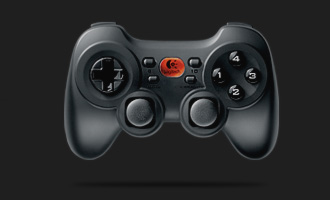
Logitech Cordless Rumblepad II - 2.4GHz USB


My gamepad of choice for my emulation-gaming ;P with:
  • rumble-function
  • frequency-jumping
  • 100 hours of battery capacity
This pad should outwin my current gamepad setup by a long-shot.

(My current setup being: 2 x "USB-to-PSone" 1m. adaptor-cables)


I've always liked Logitech's accessory product-line. I also have a laser laptop-mouse from them, with an undisputable response-time. Another reason for preferring Logitech accessories is because they use Human Interaction Device drivers (USB-HID), so they usually work flawlessly in Linux ;D

Logitech-link for Rumblepad II: http://www.logitech.com/


Update 13.04.2008:

2 x Rumblepad II are on their way! ^_^

09 March, 2008

My next tech-project ;D


eMagic 2,5" SATA USB-cabinet (yeah, ugly as f***, but it was all I could find that accepted 2,5" SATA drives), and a brand new 250GB SATA HD from Western Digital.


My project is to make some different kinds of recovery-images of my 40GB SATA HD drive from my PS3, then, install my new 250GB WD HD in the eMagic USB-cabinet, connect it to my computer and transfer the image-data to it for installation back into the PS3, approx. 200GB left to "play" with ;P