Showing posts with label Linux-compatible. Show all posts

29 June, 2016

Nvidia graphics-accelerators

After being an AMD fanboy for a long time, I must admit Nvidia has the graphics market quite cornered.

My latest upgrade included an EVGA GeForce GTX 960 4GB GDDR5 SSC ACX2.0+

The one I had before that could barely grasp on the gaming-development cycle of it's time, yet alone the newer developments.

So, after a lot of researching and testing at friend's places, I concluded Nvidia has developed the superior gaming-tool(s). PhysX has no rival technologies (in PC hardware at least), as for the newer tech: HairWorks and GameWorks, I have no special opinions. They're there. Nuff said.

I'm rather more interested in the CUDA-cores and their hardware-accelerators, more specifically NVENC the hardware-accelerated HDV-encoder.

Not to mention all the recent "woo-haw" around VR.

29 February, 2016

Google Drive on Linux

Google Drive
I didn't really think much about it, but when I started using "InSync" a few years ago, all my woes using Google Drive on desktop-Linux vanished :)

It is simply the best client-side synchronization-tool for desktop use of Google's cloud-storage solution ("Drive") on Linux today. Both simple and quite configurable at the same time.

It is cross-platform compatible, i.e.: works on Windows, Mac OS X and Linux!

Only drawback is that it costs a one-off fee of $20, but after that, you can use it on as many machines as you want :P

It basically works just like Dropbox (which actually has a Linux-native client! Boo Google!), allowing the user to maintain his file system and offering share options as well as other features by right clicking on files and widgets.

You can get InSync here: https://www.insynchq.com/downloads

02 April, 2015

Logitech Unify on Linux

I recently had to replace all my peripherals for my primary desktop / workstation, and as always; the choice fell on Logitech. I ended up getting so-called "Unify" wireless devices (mouse / keyboard).

Upon reading about using Unify-devices on Linux, I realized some smart fellow had made a simple management-suite for Linux-systems, called Solaar.

Solaar allows pairing of multiple Unify-devices to one "Unifying Receiver" (the USB-receiver dongle), through either a simple GUI tray-application (GTK-interface) or a simple command-line tool. It also offers monitoring on battery-levels (with notifications) and checks if wireless links are using encryption or not. Much like the applications used on both Windows and Mac OS X.

Solaar, running as an Ubuntu desktop-tray widget.

Installing was as simple as running the following commands:
sudo add-apt-repository ppa:daniel.pavel/solaar && sudo apt-get update && sudo apt-get install solaar;
Solaar on the web: http://pwr.github.io/Solaar/

16 December, 2012

Unified ARM Linux kernel source

Acorn RISC Machine
Finally, ARM manufacturers have been stepping up their efforts at unifying a single source-tree for their architecture(s). Linus announced the merging of multi-platform ARM code into the mainline Linux source-tree in October.

This means ARM developers don't need to compile a different Linux kernel for each ARM SoC they develop for, but instead they can use one single source-tree for all SoCs.

http://www.zdnet.com/one-linux-for-all-arm-systems-7000005348/

09 December, 2011

h3x4c0m

OK. Computer-building has always been a hobby of mine. Later years have shown that high-end components don't always have to cost an arm and a leg. So I figured I'd do a build-project where I would build a hybrid workstation / VM-lab / gaming-rig, with as much computing-power as my limited budget would allow.


The following became my project-goals:
  • Build an HTPC (Home Theatre PC) with std.-dimensions for rack/stack placement.
  • Get the most powerful and technically up-to-date cpu for as little as possible, most likely an alternative to Intel (AMD).
  • Shove in, at a very minimum, at least 8GB of RAM with decent heat spreading.
  • Make due with the stock cpu-fan and add cabinet fans accordingly.
  • Use a customizable O.C.(overclocking)-motherboard for tweaking-purposes.
I figured I'd base the machine on an AMD chipset and processor because they've always been more on the cheaper end, compared to Intel, without losing too much of the competing processing-power (allthough AMD chips generate quite a lot of heat in contrast to Intel's).


The basic assembly was quite easy. Every screw and spacer needed was included with the cabinet to ensure a good fit for the MicroATX motherboard.


Installation of the components on the motherboard was also pretty straightforward. Although I forgot to lock the cpu-chip into the cradle before I fastened the cpu-fan over it :s doh!


Silverstone's starter-level cabinet "Milo" did the job I wanted it to. It was slimline and spec-standard so it fit nicely on my Denon receiver with a Pioneer DVD player and a Canal Digital PVR on top of it, all without over-heating any metal-surfaces.
System-disk. Period ;)
Only annoying thing I didn't think about was if I wanted to add a PCIx graphics card, it has to be a "low-profile" spec-card to fit in the low cabinet. But for now the embedded HDMI port on the M/B will do (I eventually added a low-end GeForce GT520 1GB GDDR3).


I could fit up to 3 hard-drives total, but I only used a 250GB Western Digital hard-drive for personal files (/home Linux partition) and a 60GB ForceGT Corsair SSD for the OS (Linux). The SSD was a definite improvement both on heavy word-load effectiveness and boot-up (it boots Debian GNU/Linux / Ubuntu Desktop / Linux Mint in less than a few seconds!)

A metal bar is used to keep the cabinet sturdy, and does an excellent job.


One thing I noticed when installing the OS after first bootup, was that all the six cores (yes ;) that's SIX cpu-cores :p) reported an individual total processing-power of a mere 800MHz! WTF!?

This couldn't be! 800MHz x 6!? At first I figured it was the Cool'n'Quiet-feature of AMDs processor-lines that throttled everything down to save power and/or cool the cpu. This was not the case.


As I read the motherboard webpage, I realized the cpu was released after the motherboard. And even though it listed the cpu as compatible, it also said it required an EFI-update to be able to take full advantage of a hexa-core processor.
Well, that figures... So, I aggravatingly downloaded the mentioned EFI binary-blob on a USB-stick, and proceeded to flash the motherboard.

After booting up the newly upgraded firmware, it listed the cpu with the correct specifications :) YAY-HOORAY! ;D

Without discrete graphics card.

With discrete graphics-card.
* Asus GeForce GT520 2GB 64-bit GDDR3 PCie-2.
I haven't really had the time to properly benchmark the performance yet. And I think I'll postpone it until I have a proper cpu cooling-system (preferably liquid-cooling, but I haven't been able to find a low-profile cooling-system that will fit the SilverStone Milo HTPC-cabinet yet).

For now, it has shown exceptional potential as a file-/web-server, daily mailer/browser, HD multimedia powerhouse and compilation workstation :] so I'm really looking forward to pushing it to the edge :D


Next project is setting up an advanced NAS box, preferrably with iSCSI-support for Virtual Machine network-storage :]


NAS-project update: http://blog.pizslacker.org/2012/02/nas-for-vmwaremediafiles.html

Discrete graphics upgrade (Sep'2014):

New (as of Sept'2014) Sapphire Radeon HD 6670 1GB 64-bit GDDR5 PCIe-2.1 discrete graphics-card
+
Supplementary (for separate iSCSI-subnet) MiniPCIe Gigabit Ethernet card

With new Sapphire Radeon HD 6670 1GB 64-bit GDDR5 PCIe-2.1 discrete graphics-card.


24 April, 2009

Linux Mint maintainer

Clement Lefebvre is the BDFL and core maintainer of Linux Mint (an Ubuntu-based Linux distribution I'm considering to implement on my mom's, and my dad's computers because of the Windows 7-hysteria).

I really like this guy, coz he's had a very similar Linux-experience as I have since the 90's. Here's a little quote to exemplify:

I started using Linux in 1996. It was Slackware(!) and I was quite happy with it. I learnt a lot about the internals of the system thanks to that distribution. A few years later more and more distributions became available and at the same time people started to get fast Internet at home with faster and faster download speeds. So I started distro-hopping... a lot :) I enjoyed many different distributions and for different reasons.

As I became more experienced with Linux I started asking myself how I could contribute back. I spent a lot of time helping out on different IRC channels and writing tutorials and reviews on the web. Eventually I even got paid for it and started writing for LinuxForums.com (you can still read some of my contributions here). I specialized more and more on distribution reviews and after a while I became expert (or so I thought anyway :) at seeing pros and cons in each one of them.

Looking at all the other distributions, I got a very precise idea of how I would make the perfect desktop if I was to do it myself. And because everything is easy when you're having fun, it wasn't long until I was producing my first ISO files.

So, to put it all together, we started using Linux about the same time, AND we used the same distro.

And by reading his blog-posts on linuxmint.com, I realized he has a lot of the same ideas as me, quite similar development guidelines, etc.

Linux Mint appealed to me basically ;)

20 June, 2008

AMD's Linux support leap

AMD have really shown their dedication towards open source software the last couple of years. As explained in the Phoronix-article below this post, AMD has fostered not only one, but two open source driver projects with technical specifications, programming guides and register information for their graphics cards. They have even started shipping their cards with Tux printed on the retail boxes and Linux drivers included on the driver-cd's! Finally, a gfx-card manufacturer that has truly started leaning towards open development.

Personally, I've been using ATi/AMD's proprietary drivers for well over 2 years now. Cannot say I've always had positive experiences with them, but they usually worked without involving too much system hacking and modification. Actually, my experience with problems related to their drivers, were caused by internal driver functions rather than conflicts with system settings/libraries and/or software.

http://www.phoronix.com/scan.php?page=article&item=amd_evolution&num=1

17 June, 2008

Acer Aspire One


I have made my choice. I chose the Acer Aspire One.

Specs:

  • CPU: Intel Atom N270 (1.6GHz, 533MHz FSB, 512 KB L2 Cache).
  • Memory: 512MB DDR2 533MHz on-board (Upgradable to 1GB or 1.5GB using 512MB or 1GB soDIMM).
  • Display: 8.9" WSVGA (1,024 x 600), LED Backlit, 180 cd/m2.
  • Storage: 8GB NAND Flash Module (Linux Versions) & 80GB 2.5in HDD (Windows XP Versions), Memory Card Reader (SD, MMC, RS-MMC, MS, MS PRO, xD).
  • Audio: Integrated Intel HD Audio, Integrated Microphone & Speakers
  • Communication: 802.11b/g Wi-Fi, 10/100 Fast Ethernet, Integrated 3.6MB 3G/HSDPA (Optional), WiMAX (Optional), 0.3 Megapixel WebCam.
  • Dimensions: 249 x 170 x 29mm (WxDxH) for NAND Flash and 3-cell battery version; 249 x 195 x 36mm for HDD version with 6-cell battery.
  • Weight: 995g for NAND Flash, 3-cell battery versions; 1.26kg for HDD/6-cell versions.
  • Battery: 2200mAh 3-cell battery (3 hours life); 2600mAh 6-cell (7 hours life) - figures derived from NAND Flash editions.
  • Warranty: 1 Year Carry-in, upgradeable to 2 Years.

Ordered June 20., Confirmed delivery date: 01.07.2008.

Est.delivery change #1: 09.07.2008.

Est.delivery change #2: 25.07.2008.

Est.delivery change #3: 01.08.2008.

Cancelled order @ retailer, re-ordered @ another retailer June 27., Confirmed delivery date: 09.07.2008.

Est.delivery change #1: 02.08.2008.

Est.delivery change #2: 29.07.2008.

01.08.2008 10:30am - IT HAS ARRIVED! ;p w00h00!

04 June, 2008

Upgrading to Slackware-12.1

A linux.com article reviewing the new Slackware release, click the post title to read.

30 May, 2008

Open Source Software FTW!

Promising, promising...

I can't wait until an OEM releases a cellphone with a fully implemented Android software stack. The embedded video below (sporting 2 developers from Google), demonstrates the (simple,sleak,usable) beautiful user interface and some of the current functions from Android. If the final released version even resembles what they show here, I'm _definately_ switching to an OSS Cellphone!

Actually, I'll probably switch most of my embedded equipment to OSS-driven products, and especially Android, because it's Google-sponsored. Giving me a "all-in-one" solution to; e-mail, browsing, text-messaging and telephony. And if they incorporate a Blogger-feature into Android, I'll be in techie-heaven! ;P


iPhone, eat your heart out!

http://code.google.com/android/

I love Google ^_^

21 April, 2008

My God...are they serious?

Ok, from madpenguin.org, comes this shocking article regarding HDD-support for Linux(!). Excerpt from the article:

Welcome Back, Western Digital!

I never thought I would see the day when hard drives were added to the Linux compatibility list of works or needed a workaround. But it seems that Seagate has made history there. Way to go guys, too bad we Linux users, being geeks, likely make up more hard drive sales than you likely figured into this boneheaded maneuver.

As the headlines are filling up with Seagate's recent acquisition of metalincs, it's a shame to see the vendor now having to narrow their business to one spectrum while expanding it on another.

Article-link:
http://www.madpenguin.org/cms/?m=show&id=8121

Long-story-short: hard disk drives are now listed on the Linux Compatibility List due to the fact that Seagate (major PC hard drive manufacturer), announced that they will drop Linux support for their products. *Sigh* Guess I'll be relying on Western Digital like MadPenguin ;) Not that I favoured Seagate in any way before this news. In fact, the first drive I ever crashed and totally destroyed beoynd repair, WAS a Seagate! XD *roflmao*

14 April, 2008

Cisco Turns Routers Into Linux Application Servers

I've always had a good eye to Cisco's networking equipment, due to the fact that they are administered through a CLI (Command Line Interface), i.e.: POSIX-style ;^)

Now they're integrating a GPL'ed Linux environment on certain so-called "AXP" switches/routers to allow for hosted applications developed with the accompanying standardized SDK and API (which includes standard support for C, Java and Python).

"From a GPL perspective, we've taken all the things that are GPL and reciprocated the code back to the community," Conover said. "Obviously if a developer built an application on top of a GPL platform, that doesn't imply that they have to GPL that code. "


The GPL is a reciprocal license that requires any modification made be contributed back to the community.


Overall, Cisco expects the AXP to reduce the hardware footprint at branch offices and provide deeper network integration that provides IT managers with more control over what they can monitor.

I suppose they realized the potential for hosted applications on network equipment after releasing the WRT54** series of routers through their sister company "Linksys". These routers offer the possibility to flash the firmware, allowing home-brewed firmware/software to be deployed. I have a WRT54GL router @ home, running "DD-WRT" with a few cross-compiled custom apps for network monitoring. And I must say, it gives me monitoring capabilities I never could have imagined a few years ago ;)

24 March, 2008

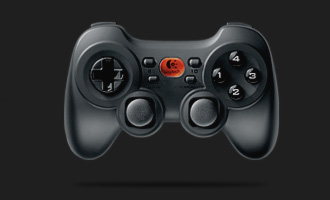
Logitech Cordless Rumblepad II - 2.4GHz USB


My gamepad of choice for my emulation-gaming ;P with:
  • rumble-function
  • frequency-jumping
  • 100 hours of battery capacity
This pad should outwin my current gamepad setup by a long-shot.

(My current setup being: 2 x "USB-to-PSone" 1m. adaptor-cables)


I've always liked Logitech's accessory product-line. I also have a laser laptop-mouse from them, with an undisputable response-time. Another reason for preferring Logitech accessories is because they use Human Interaction Device drivers (USB-HID), so they usually work flawlessly in Linux ;D

Logitech-link for Rumblepad II: http://www.logitech.com/


Update 13.04.2008:

2 x Rumblepad II are on their way! ^_^

09 March, 2008

More computer equipment.

CNet 54 Mbps 802.11g Wireless USB Dongle, for my desktop-computer@home.


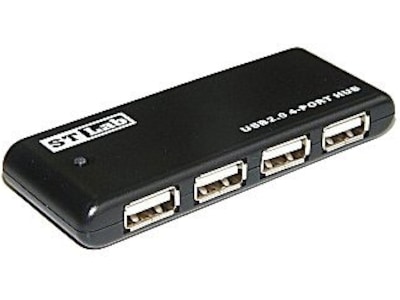
Sunsway ST Lab USB 2.0 Pocket Hub 4P (bus powered), for my PS3.

And at last, my sound will be digitally processed ;P

Creative SoundBlaster X-Fi Extreme Audio, is on the way!

CNet PCI 54 Mbps 802.11g Wireless (RaLink chip), for my Linux gateway!

And finally, CNet Directional Antenna 6dBi 2.4 Ghz RP-SMA connector, to get better range and coverage of the WLAN@home.