
Promising, promising...
I can't wait until an OEM releases a cellphone with a fully implemented Android software stack. The embedded video below (sporting 2 developers from Google), demonstrates the (simple,sleak,usable) beautiful user interface and some of the current functions from Android. If the final released version even resembles what they show here, I'm _definately_ switching to an OSS Cellphone!
Actually, I'll probably switch most of my embedded equipment to OSS-driven products, and especially Android, because it's Google-sponsored. Giving me a "all-in-one" solution to; e-mail, browsing, text-messaging and telephony. And if they incorporate a Blogger-feature into Android, I'll be in techie-heaven! ;P
iPhone, eat your heart out!
http://code.google.com/android/
I love Google ^_^
30 May, 2008
Open Source Software FTW!


19 May, 2008
Linux-Live: Pocket Operating Systems
 I've tried a lot of different flavours (Knoppix,Belenix,CentOS,Linux Mint,etc...). And I've always gone back to my favourite every time I've tried a new one, mainly: Slax.
Since it's based on Slackware (of course), it basically gives me all the superuser functionality I demand from my computer systems, while also providing a simple (non-hardware-accelerated) KDE desktop and basic built-in applications.
I've used Slax before, but I wasn't quite satisfied with the storage mounting system not being fully configured in v5, to allow mounting of USB storage devices automatically (yes, I prefer _some_ automation for basic tasks). Version 5 also incorporated a package system (much like Slackware), only, the packages were built as modules, to be easily added/removed on-the-go. This was also one of the features I did not favour very much, as it would lock up the system at times as i was removing package-modules while the system was actively running X, but this also seems to have been fixed in v6.
Features:
- distribution has reached a more stable level compared with earlier releases.
- it is based on Slackware Linux 12.1 (running the 2.6.24.5 Linux kernel).
- system size is now reduced to a mere 195 MegaBytes, thanks to the merging of 7Zip-compression (LZMA) into the squashfs filesystem.
- it now has the ability to determine if it is running from a writable or unwritable media, and saves system configs accordingly.
- it includes an X Window System and a collection of general network-enabled applications (browser,mail,chat,ftp,games,utilities,etc.), all ready to be used out-of-the-box.
- it now includes gcc out-of-the-box, giving the ability to compile third party software, which can then be packaged into software-modules afterwards for quick installation/removal.
- software-packages do not occupy a lot of space thanks to 7Zip-compression (modules now has the '.lzm' file extension).
- installation of additional software is easy using the new 'Slax Module Manager', grabbing software-modules from online software repositories, or local media.
- it has procured a large user community, useful for third party support.
- and it can be burned onto a CD-R or copied to a USB memory dongle like most other linux-live distros, but apart from other distros, it includes very intuitive installers for these tasks as well.
It is also a very powerful rescue-tool, allthough you CAN use the Slackware install-disc to do the same tasks, Slax lets you boot into an X environment whereas Slackware restricts to the command line.
18 May, 2008
Why I love Slackware
A few minutes ago, I read an article ranting on about the recently released Slackware Linux v12.1, where the author expressed what he thought of Slackware as a Linux distribution.
[Slackware is (in conjunction with Debian) the oldest living Linux distro out there since the early 90's. Read my post about Slackware Linux in general.]
The author noted that Slackware (being an old-timer, has over 10 years of software maintainer experience in package-building) enforces strict packaging routines in the Slackware community; following source programmer instructions to the letter with regards to configure-options at compile-time, and standardizing the prefixes where the configuration and binary files are stored on the system.
This packaging method makes the packages extremely portable across different systems, as long as the systems retain the standard libraries and utilities included in the build-system (also known as a "vanilla base-system").
And the fact that it has only one maintainer at the top, having the final word on configuring and building of Slackware-software; the all-mighty (BDFL of Slackware Linux) Patrick Volkerding, makes it the closest distribution one can find to a "vanilla" system (or: "generic-type" "all-in-one" Linux base platform). Leaving plenty of room for: personal tweaking, custom branding, hacking, expansion and forking.
This focus on simplicity in maintenance, makes Slackware the perfect candidate for base-systems destined to fork-modifications. Therefore, a lot of distro-developers swear by Slackware as their base-system, as it allows for some major modifications without breaking as easily as other, heavily modified distributions that require a lot of dependancy-tracking.
- Now, it should be mentioned that Slackware does not include a packaging-system that incorporates dependancy-tracking, so it is not a distro recommended for 'non-tech-savvy' people (computer-n00bs) as it requires that you do all the command-line work manually.
- AND, you are _absolutely_ forced to learn the inner workings of the system to modify it without breaking any functionality. So it has it's caveats, but these caveats just improve your understanding of the system, making you (the developer), master maintainer and developer of the aspiring distribution being made.
Everything I've learned about Linux; was either read about in the included documentation, or found online in Slackware forums. So I've done my fair share of information investigation, which is also a required ability in the open source world.
11 May, 2008
Slackware 12.1 upgrade successfull
Successfully installed/upgraded my 3 computers with Slackware Linux 12.1! ;P
- (Desktop machine, "slamd-wifi")
- AMD Athlon XP 2200MHz | 1,1GB DDR RAM
- (Notebook machine, "slackbell")
- AMD Mobile Sempron 1800MHz | 1,1GB DDR2 RAM
- (Laptop machine, "paqslack")
- AMD Mobile Athlon XP 800MHz | 256MB DDR RAM
07 May, 2008
quotation is KING
"Mediocrity knows nothing higher than itself,
but talent instantly recognizes genius."
Sir Arthor Conan Doylee 1859-1930
Spill


Ralph Baer >
Som med mye annet data-relatert, ble idéen om dataspill virkeliggjort gjennom leking med teknologi. Og under 2. verdenskrig, jobbet Baer som avhørsleder og ble senere tilsatt som teknologisk ansvarlig for datasystemene som utførte missilberegning for militæret. Når man innehar en slik alvorlig stilling, var det viktig å kunne rette fokus vekk fra ansvaret for å slappe av og lette tankene. Dette gjorde Baer ved å "leke" med teknologien han jobbet med. Trikse og mikse, finne andre bruksmuligheter. Og idéen om å kunne bruke TV som et såkalt "varmt" medium ble født. TV, som tidligere bare hadde vært et "kaldt" medium hvor negative nyheter ble servert uten mulighet for å kontrollere hva som ble servert, ble plutselig et kontrollerbart underholdningsmedium med innførelsen av maskinen Magnavox Oddyssey. Ralph Baer anses å være "bestefaren" til data-/TV-spill, som oppfinneren av den første TV-spill konsollen, forløperen til det første dataspillet med interaktivt brukergrensesnitt: "PONG" (laget av programmereren/elektronikk-ingeniøren Al Alcorn).

Aleksei Pazjitnov >
1985, Vitenskapsakademiet i Moskva. Matematikeren Aleksei Pazjitnov gjorde som mange hackere gjør i dag; lekte seg med datamaskiner for å utforske bruksmulighetene, akkurat som Baer gjorde med militær-teknologi for å skape noe som kunne brukes til noe sosialt og positivt, enn bare ødeleggelse. Resultatet ble det mest innovative dataspillet til dags alder: "Tetris".
[Helt fra begynnelsen av spillalderens fødsel (70-,80-tallet), har militær-industrien og spill-industrien vært sammenflettet. Og det er dette samarbeidet som sannsynligvis har påvirket spill-utvikling mot en destruktiv opplevelses-modell.]
Poenget mitt med dette innlegget er å fremvise at nyvinning i teknologi som regel har skjedd som en følge av at bruksområder for teknologi har blitt påvirket av skaperne fordi de ville bruke skapelsene til noe annet enn bare strategisk og negativ fremkallende bruk.
Teknologisk nyvinning har derfor alltid interessert meg fordi det til stadighet har resultert i uante muligheter. Og siden vi lever i teknologi-alderen, med informasjonstilgang folk ikke kunne ant var mulig for et par tiår siden, hvem vet hva som venter rundt hjørnet? ;D
Innlegget ble også svært inspirert av Discovery Channel-programmet:
28 April, 2008
PlayStation® Portable v1!
Homebrew heaven! ;P I was able to get a hold of a version-1 PlayStation® Portable system! And I absolutely love it! Machine specification:
Yeah, it's a bit larger and heavier than the slim-version, but hey, I can modify it to satisfy my every portable gaming need ;D
Just to note a little about the functions, the RemotePlay-feature for use with the PlayStation® 3 system was pretty fun. Allthough WLAN latency usually makes the feature lag when playing video's, it's pretty well designed. Using my PS3 to stream music and multimedia through WLAN and the Internet wasn't actually that bad, considering it's a RISC embedded portable machine.
The PlayStation Portable measures approximately 17 x 7.3 x 2.2 cm (6.7 x 2.9 x 0.9 in) and weighs 280 grams (9.88 ounces). The front of the console is dominated by the system's 11 cm (4.3 in) LCD screen, which is capable of 480 x 272 pixel video playback with 16.77 million colors.
Also on the front are the four PlayStation face buttons, the directional pad, the analog 'nub', and several other buttons. In addition, the system includes two shoulder buttons and a USB 2.0 mini-B port on the top of the console and a WLAN switch and power cable input on the bottom.
The back of the PSP features a read-only UMD drive for movies and games, and a reader compatible with Sony's Memory Stick Duo flash cards is located on the left of the system. Other features include an IrDA compatible infrared port, built in stereo speakers and headphone port, and IEEE 802.11b Wi-Fi for access to the Internet, ad-hoc multiplayer gaming, and data transfer.
The PSP uses a 333 MHz MIPS R4000 (32-bit) CPU, a GPU with 2 MB onboard VRAM running at 166 MHz, and includes 32 MB main RAM and 4 MB embedded DRAM. The CPU was originally locked to run slower than the hardware was capable of and most games ran at 222 MHz. However, with firmware update 3.50 on May 31, 2007, Sony removed this limit and allowed new games to run at a full 333 MHz.
The PSP includes an 1800 mAh battery that will provide about 4-6 hours of gameplay, 4-5 hours of video playback, or 8-11 hours of audio playback.
Official accessories for the console include the AC adapter, car adapter, headset, headphones with remote control, extended-life 2200 mAh battery, battery charger, carrying case, accessories pouch and cleaning cloth, and system pouch and wrist strap.
---
Update 11.05.2008 18:34
---
Ok, after struggling with some rather irritating hardware (read "old machine, with new battery-case which apparently is not hardmod-compatible".., fuck...), turns out my "homebrew" idea got nowhere slow... I have to either; buy a Pandora battery case, OR borrow one from a friend to make my PSP homebrew capable. Ah well, nothing ever goes 100% according to plan I suppose...
21 April, 2008
My God...are they serious?
Ok, from madpenguin.org, comes this shocking article regarding HDD-support for Linux(!). Excerpt from the article:
Article-link:Welcome Back, Western Digital!
I never thought I would see the day when hard drives were added to the Linux compatibility list of works or needed a workaround. But it seems that Seagate has made history there. Way to go guys, too bad we Linux users, being geeks, likely make up more hard drive sales than you likely figured into this boneheaded maneuver.
As the headlines are filling up with Seagate's recent acquisition of metalincs, it's a shame to see the vendor now having to narrow their business to one spectrum while expanding it on another.
http://www.madpenguin.org/cms/?m=show&id=8121
Long-story-short: hard disk drives are now listed on the Linux Compatibility List due to the fact that Seagate (major PC hard drive manufacturer), announced that they will drop Linux support for their products. *Sigh* Guess I'll be relying on Western Digital like MadPenguin ;) Not that I favoured Seagate in any way before this news. In fact, the first drive I ever crashed and totally destroyed beoynd repair, WAS a Seagate! XD *roflmao*
Cross-browser compatibility!
Yes! I have finally achieved my goal... ;^) The blog is now cross-browser compatible (it displays correctly no matter what architecture/webbrowser is used to view the page).
This whole ordeal, is basically caused by the fact that Microsoft's Internet Explorer does not conform to the open web standards of the W3C (World Wide Web Consortium), meaning; it does not display webpages developed on open standards correctly: http://en.wikipedia.org/wiki/Internet_Explorer#Standards_support. The features not fully supported at the time of writing, include: CSS rendering issues + partial PNG (Portable Network Graphics) alpha support (opacity / transparency).
So, we as web-developers (who rely heavily on open standards to deliver a consistent experience to users no matter what hardware or software they are using), are forced to implement so-called "CSS-hacks" (Style Sheet Hacking), to enforce a proper user-end rendering of the website.
But I can now confirm compatibility with the following browsers (on Windows XP SP2 / Vista and Linux 2.6.x):
- Internet Explorer 7.x (WinXPSP2/Vista)
- Mozilla Firefox 2.0.0.x (WinXPSP2/Vista/Linux 2.6.x)
- Opera 9.2x (WinXPSP2/Linux 2.6.x)
- Opera Mini 3.x (Sony Ericsson K810i)
- Sony Ericsson's K810i integrated phonebrowser (Sony Ericsson K810i)
20 April, 2008
new_job: xhtml+css+gfx+asp?
Looks like I may be working a lot with webpages / backend scripting / design after my current work contract expires (out May'08 I've been told).
I was asked by a friend of my mother, if I were interested in working with webpage development / design some 3 months ago. As this is what I've always wanted to do, this is basically a dream come true. I went by their offices last thursday (April 17th), to see the server room, check out their systems and to see if I felt comfortably settled in at my own desk(!).
My work tasks will in the early stages be:
- HTML/XHTML and CSS scripting.
- Eventually, create/modify ASP scripts.
- Adapt functionality per customer request.
14 April, 2008
Cisco Turns Routers Into Linux Application Servers
I've always had a good eye to Cisco's networking equipment, due to the fact that they are administered through a CLI (Command Line Interface), i.e.: POSIX-style ;^)
Now they're integrating a GPL'ed Linux environment on certain so-called "AXP" switches/routers to allow for hosted applications developed with the accompanying standardized SDK and API (which includes standard support for C, Java and Python).
"From a GPL perspective, we've taken all the things that are GPL and reciprocated the code back to the community," Conover said. "Obviously if a developer built an application on top of a GPL platform, that doesn't imply that they have to GPL that code. "
The GPL is a reciprocal license that requires any modification made be contributed back to the community.
Overall, Cisco expects the AXP to reduce the hardware footprint at branch offices and provide deeper network integration that provides IT managers with more control over what they can monitor.
13 April, 2008
Improved blog layout & design
I have now fixed a lot of my earlier bugs in the CSS script for the blog.
I also added some javascript code to import my del.icio.us links.
My blog now nearly conforms to valid CSS-3.0 and XHTML-1.0-STRICT, but not quite yet. Basically, it's because of some untraditional hacks in CSS for IE-bugs on float alignment, and also, the XHTML because of some bad syntax variables, but they are all contained in the widgets used in the sidebar, and I won't hastle to inform all the developers about it, simply because there are a few of them, and it doesn't bug me...
My revisions of the CSS and XHTML style template-files are valid, so, I'm happy ^_^
Embedded Linux: "Instant-On"
Yes :) They have finally done it! An Instant-On operating system, booted from an external USB flashdrive, or embedded on the motherboard (clever).
SplashTop Instant-On at CES 2008, YouTube promo video:
The video demonstrates the "ASUS Express Gate" Instant-On system booted using a flashdrive. Just a couple of seconds boot-time, and you have basic browsing and e-mail capabilities, it's a definite MUST-HAVE for when I buy my first UMPC.
24 March, 2008
Logitech Cordless Rumblepad II - 2.4GHz USB
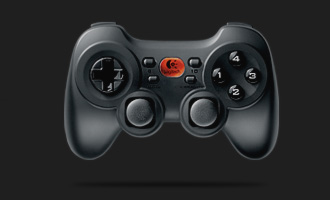
- rumble-function
- frequency-jumping
- 100 hours of battery capacity

23 March, 2008
"The trinity of the table"
A french expression regarding wine, bread and cheese.
I'm not a big fan of the first, but I love the two latter. Maybe I just haven't found a bouquet that suits my taste? My general description of wine would simply be: "acid-water". Basically, I don't like acidic taste. But as they say, taste becomes better with age. So who knows? Maybe I'll grow to like wine some day.
18 March, 2008


15 March, 2008
Security focus: Securing Linux
Security focus published two articles on securing Linux systems. But the cool bit, is that they refer a lot to my favourite distribution, coincidence? ;P (Got Slack?)
09 March, 2008
SSH, domains, crypto...
Finally, I've acquired a location to set up a desktop computer as a domain-gateway for my personal LAN/WAN/WiFi-connections! Sw33t! My earlier conclusion to carry an USB memory dongle was a good idea. I got so many notifications about brute-force attack-attempts running SSH-blockage rules on my firewall, so I decided to drop them all together.
Using private-key authentication with a passphrase, proved to be MUCH better. Nearly any excessive bandwidth-overhead, nor serious lagging (which was the main problems when running SSH firewall rules for brute-force attack tracking and blocking. It was basically too CPU intensive to be useful).
Regarding the key-authentication, both the generation of keys, and re-configuring of the SSH server to accept the keys was pretty straightforward. So now I'm enjoying fully secured SSHv2 sessions.
But again, I decided against utilizing some parts of my plans, like using 256bit AES cipher, instead of the intended 448bit Blowfish cipher, as it would be overkill with regards to the processing power available on the desktop machine I'm going to use ;P (Pentium-III 1st gen. 800Mhz). From what I know, Norwegian government-sections use 256bit AES, so it will more than suffice for my uses. Less is more.
I also set up a basic, free static hostname (with wildcards) to reach my public gateway-machine, and a secondary hostname for dynamic http-forwarding to the web-server hosted on the domain.
Good luck to the ones wanting to crack these streams! ;D

More computer equipment.
 CNet 54 Mbps 802.11g Wireless USB Dongle, for my desktop-computer@home.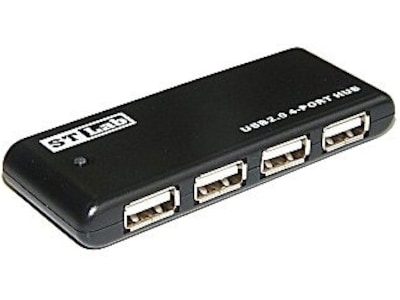
Sunsway ST Lab USB 2.0 Pocket Hub 4P (bus powered), for my PS3.
And at last, my sound will be digitally processed ;P
 Creative SoundBlaster X-Fi Extreme Audio, is on the way!
 CNet PCI 54 Mbps 802.11g Wireless (RaLink chip), for my Linux gateway!
 And finally, CNet Directional Antenna 6dBi 2.4 Ghz RP-SMA connector, to get better range and coverage of the WLAN@home.
My next tech-project ;D
eMagic 2,5" SATA USB-cabinet (yeah, ugly as f***, but it was all I could find that accepted 2,5" SATA drives), and a brand new 250GB SATA HD from Western Digital.
My project is to make some different kinds of recovery-images of my 40GB SATA HD drive from my PS3, then, install my new 250GB WD HD in the eMagic USB-cabinet, connect it to my computer and transfer the image-data to it for installation back into the PS3, approx. 200GB left to "play" with ;P


06 March, 2008
Elonex ONE
Linux UMPC from UK :)
http://www.elonexone.co.uk/index.html
04 March, 2008
Første Linux-innlegg denne mnd, ;P
Kom på at jeg har skrevet relativt lite om Linux i det siste...til å være meg, er dette heller unormalt XD Men etter å ha lest artikkel på hardware.no om den første Linux kjernen som kom ut i år, ble jeg ivrig igjen.
http://www.hardware.no/artikler/aarets_forste_linux-kjerne/47816
Artikkelen trekker frem punkter som at 2.6.24-kjernen nå har bedre støtte for flere forskjellige prosessorer, og at koden for 32- og 64-bit databehandling nå er forent i samme kildekode.
Til sammen ble kodeendringene i denne utgivelsen på rundt 300.000 linjer, laget av 950 forskjellige utviklere fra 130 forskjellige selskaper rundt om i verden. ^_^
03 March, 2008
Slackware software repository
Once I've set up my static IP, and gotten either a Dynamic DNS address or a static domain-name, I've thought of setting up a basic FTP housing a repository of my private generated/pre-built vanilla Slackware software packages ;) address coming soon!
Packages should work on any vanilla/unmodified versions of Slackware Linux 12.0.
Any requirements are added in 'slack-required' files in the packages, making 'slapt-get' able to find, download and install requirements so the software included should work out-of-the-box.
Any non-standard requirements are present in the repository.
Extending your laptop battery life on Linux
Phoronix has an interesting article on using PowerTOP from Intel and your graphics card control-panel utility to extend the battery-power lifespan. PowerTOP analyzes the system it runs on, and from the results, it recommends and even configures the system-changes and power consumption features needed to utilize the battery-capacity in an optimized fashion, like avoiding idle wake-up calls in hardware and such.
http://www.phoronix.com/scan.php?page=article&item=ubuntu_battery_life&num=1
My notebook's battery has already seen it's last days. But I'll be buying a new one soon, and then I'll be experimenting with this to see if I can extend beyond the 2 hours specified in the manual (that is to say: running the machine with Windows XP with all features turned on).

 Posts
Posts



