03 April, 2022

Teletype / TTY

A teleprinter (teletypewriter, teletype or TTY) is an electromechanical device that can be used to send and receive typed messages through various communications channels, in both point-to-point and point-to-multipoint configurations.


Initially they were used in telegraphy, which developed in the late 1830s and 1840s as the first use of electrical engineering, though teleprinters were not used for telegraphy until 1887 at the earliest.

The machines were adapted to provide a user interface to early mainframe computers and minicomputers, sending typed data to the computer and printing the response. Some models could also be used to create punched tape for data storage (either from typed input or from data received from a remote source) and to read back such tape for local printing or transmission.

One such (deprecated in these days (2022)) computer-based teletype device, was the portable Minitel.
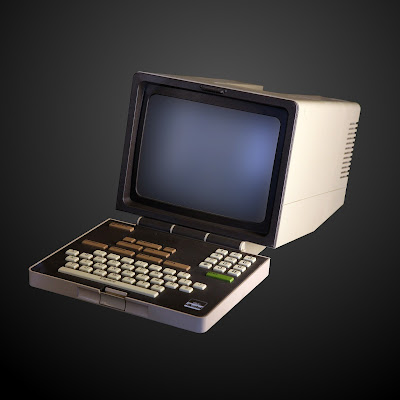

The Minitel was a videotex online service accessible through telephone lines, and was the world's most successful online service prior to the World Wide Web. It was invented in Cesson-Sévigné, near Rennes in Brittany, France.

The service was rolled out experimentally on 15 July 1980 in Saint-Malo, France, and from autumn 1980 in other areas, and introduced commercially throughout France in 1982 by the PTT (Postes, Télégraphes et Téléphones; divided since 1991 between France Télécom and La Poste).

From its early days, users could make online purchases, make train reservations, check stock prices, search the telephone directory, have a mail box, and chat in a similar way to what is now made possible by the World Wide Web (Internet).

In February 2009, France Télécom indicated the Minitel network still had 10 million monthly connections. France Télécom retired the service on 30 June 2012.

The service was purely PSTN-based (aka public switched telephone network / "plain old telephone system") and required a subscription land-line.

Recently I came over a Norwegian model on a Norwegian auction-site (finn.no), which would be the ideal complement to my next hobby-project: a PDP11/70 Unix mini-replica minicomputer. So I bought it.


This is the Alcatel Terminus 258. A Minitel2-clone made for the Norwegian telecom authority at the time (Televerket, branded on the keyboard-latch in the image above).


The specimen I have is the Unitel-version, meaning; it is not catered for the Minitel-service, but as a control terminal using either a PSTN (Public Switched Telephone Network) or a serial (DIN connector) uplink.


14 January, 2022

Pinecil - open-sauce solder pen


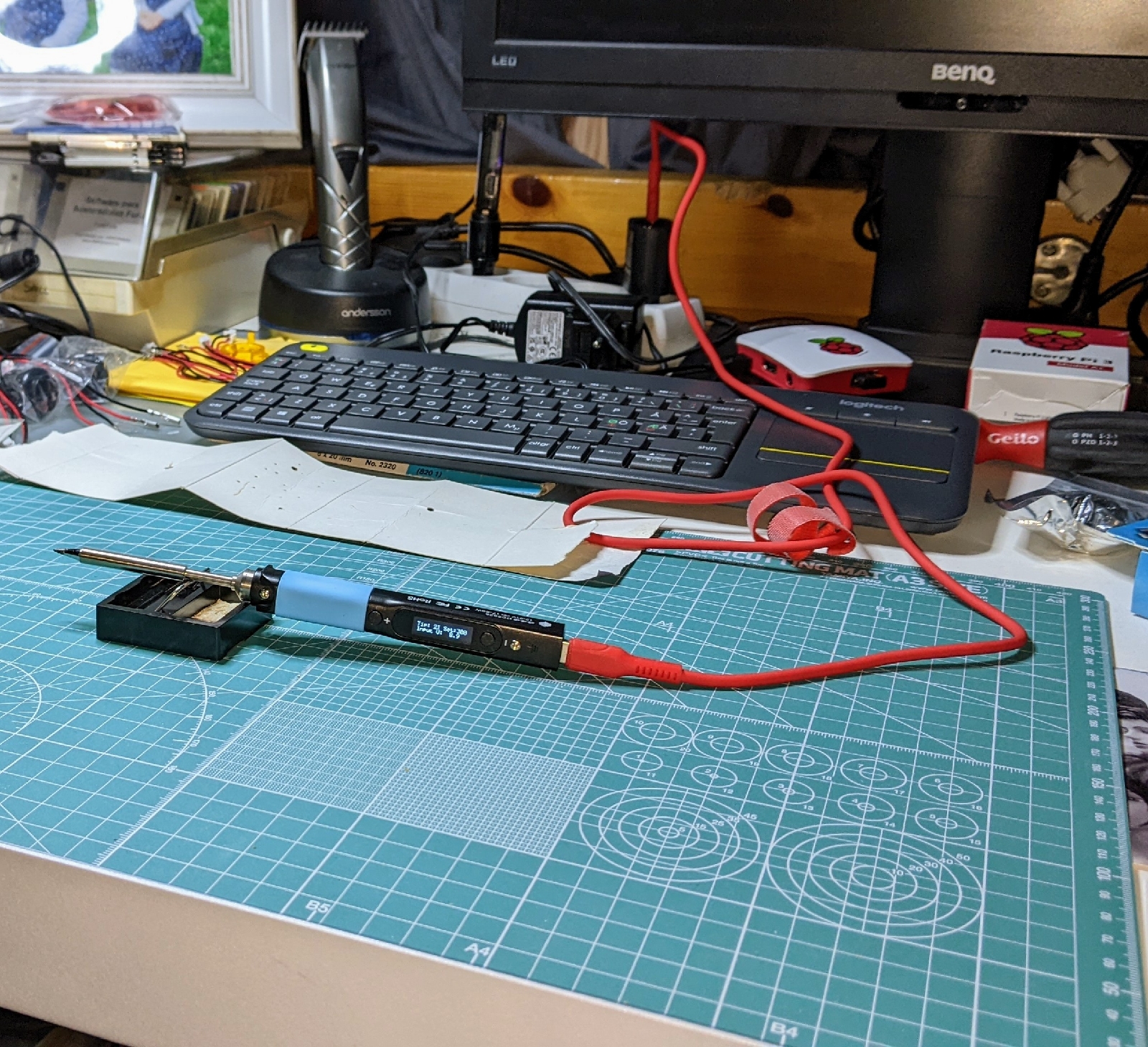
Finally got a decent (and easily portable) soldering pen, the Pinecil!

"The Pinecil is a smart mini portable soldering iron with a 32-bit RISC-V SoC featuring a sleek design, auto standby and it heats up to an operating temperature in just 12 seconds!"

Paired with a proper A/C adapter that can supply (at least) 3A @ 9V, you'll be able to do some serious mid-tier soldering with the right soldering tips.


Specs:

Dual power input design: 1) USB-C supports both PD and QC 3.0 and; 2) DC5525 barrel DC jack.

Speedy Rapid Warmup: Reaches operating temperature in 12 seconds. Support for on-demand rapid boost feature.

Adjustable soldering tip temperature which can be set between 100° C and 400° C using the adjustment buttons and an easy-to-read OLED display.

Portable: it features a sleek and slim design, comprised of an SAE 304 stainless steel core housed inside a polycarbonate shell.

Auto standby mode engages when it is not in use ensuring the user safety.

30 December, 2021

MAME / arcade-stick 🕹️ part 2


Time for some Q/A...


...and some game testing :P


27 December, 2021

MAME / arcade-stick 🕹️ part 1


Assembled the acrylic top + buttons + plastic bottom.


Attached joy-stick assembly to top.


Getting ready to wire up everything control-wise.

Wired up and attached to zero-delay USB controller-board.

01 August, 2021

Amiga OS 3.2 installation 💾


Kickstart ROM v1.3 removed...


Modified Kickstart ROM v3.2 to be installed...


Kickstart ROM v3.2 installed in motherboard...


Kickstart 3.2 + Workbench 3.2 version info


Apparently v3.1 coded applications work on v3.2 👌😎


26 July, 2021

Amiga OS 3.2 💾


Time to upgrade both my Amiga's I guess :P
https://www.ctrlaa.com/#!/pictures

  • Amiga 500 (Rev6a)
    w/ACA500Plus 42MHz accelerator
    Dual CF card storage

  • Amiga 600
    w/Furia 44MHz accelerator
    CF card storage


08 May, 2021

OpenTendo


Oh yes, the OSHW projects are dropping right and left!

The video is showcasing the build of an open-source hardware re-creation of the Nintendo Entertainment System (NES).

19 January, 2021

AmigaOS C development

Cross-compilation on x64 Linux >> m68k AmigaOS.


AmigaOS C program source-code.


Executing cross-compiled window program on AmigaOS.
 

12 December, 2020

OSHW


open source hardware


Just recently browsed through Open Source HardWare projects online, and to my surprise there have been popping up a lot in later years.

Personally, I haven't been deep in hardware modding or creation. But I've done some soldering on old IC-boards for practise, like: re-flowing ICs, re-capping boards, stripping traces and an occasional botch-wire to repair traces.

Though I have been playing with the idea of making up a modular kit-PC for DOS use.

30 October, 2020

Happy Dennis M. Ritchie day!


Dennis MacAlistair Ritchie (September 9, 1941 – c. October 12, 2011) was an American computer scientist.

He created the C programming language and, with long-time colleague Ken Thompson, the Unix operating system and B programming language.

04 September, 2020

USB 3.0 vs USB-C 3.2

32GB USB 3.0 flash-memory

128GB USB-C 3.2 flash-memory


02 September, 2020

New hobby


29 August, 2020

19 August, 2020

Yet another Amiga...

 Yeah, I definitely have a problem 😂😂

Got a hold of another Amiga computer, this time an A600, basically an upgraded A500+ in a much smaller form-factor.


A very fine specimen, re-capped and equipped for many more years of fun and operation 😎

19 June, 2020

Amiga 500 cap-kits


Got a hold on some spare capacitor-kits for my Amiga 500 Rev 6a, so I should be safe for a couple of more years at least 👌💀

I just love it that in 2020, I can still get replacement supplies for an over 30+ year-old multimedia computer.

Dedicated fans who love the system so much, that they spend their own time gathering together supply-kits to offer back to the community.

The community around Commodore-stuff, is just wonderful 😊 reminds me quite a lot of the Linux community. If you have a need, and there are no available solutions, you MAKE them.

Replacement component kits, replacement chassies, new-old microchip stocks, modification-kits, accelerator boards, "trapdoor" memory-boards and whatever else you could desire.

#BetterSafeThanSorry #CommodoreAmiga

09 May, 2020

Amiga A500 + 1084S

Finally got my A500 setup complete, like I used to have 😄


15 December, 2019

Google Chromebooks


A few tips for Chromebook-beginners, from an ex-beginner :P

  1. Plug in your Chromebook device with the supplied power-adapter!

    You cannot power on the device right after unboxing, Google have really made sure you have to plug in the device before the on-board battery is linked to the Chromebook motherboard.

  2. Make a Google account!

    The Chromebook-devices are online account driven. Every detail (logins, wifi-passwords, IoT devices, documents, links, etc.) gets "siloed" into the Google online account cloud storage.

    Allthough you yourself control the encryption passphrase and / or more security (2FA / HW Enc.). And Google does not take ownership of the content you upload into their services, like Apple does with iCloud (yes, look it up).

  3. Share it with friends and family!

    Because the Chromebook-devices are online account driven, they are also easy to swap out (online account contains everything needed to set up just like your previous device) and share between friends and family (easy account-swap directly from control-panel or login-screen.

  4. Enable Play Store to use Android-apps!

    Chromebook-devices are (basically) running Android made for tablets (that sport a track-pad and keyboard). So you only have to sign in to Play Store and every app you use on your smart-phone will be available for your Chromebook, although some apps are not optimized for big screens so actual use may vary.
You really can use both the Android-app version of a service, or use the same service in the Chrome web-browser. Quality of use may vary a bit depending on if the app is optimized for big screens in 16:9-mode (widescreen).

A couple of personal notes:

  • These devices are not fully Stadia-compatible at the time of writing.
  • I could NOT install the Stadia-app ("not compatible with your device at this time").
  • Nor could I launch a game through the web-portal in Chrome.
  • And the chromebook did not recognize the Stadia-controller on a USB connection.

29 November, 2019

Google Stadia

Yes, I was one of the "fortunate" one's that got a hold of a Founders Edition Stadia-pack.

Stadia - Google Photos Album


The pack includes:
  • Google Stadia Founders Edition Pro controller
  • USB-C cable for PC-use / charging
  • Google Chromecast Ultra HDMI-dongle
  • Power-adapter for Chromecast Ultra
  • and some Stadia-stickers 😂


I have to admit, the controller is actually pretty good. Sure, some exceptions do exist, but they are rather minor ("clicky" D-pad, raised buttons, etc.).

Overall it's pretty decent.


10 November, 2019

Amigan Joy


Streaming- / recording-setup
Flylink HD > HDMI splitter > USB 3.0 HDMI capture-dongle. Allowing for FHD (1080p/60Hz) streaming / recording. Hidden on the lower shelf of the top bench with the joyboards and dustcover.


Arcade Evolution Amiga joy-boards
DB9-connected arcade-sticks for the Amiga computers.

Commodore Amiga 500 Rev 6a
Upgraded from OCS to ECS (relative to 500+ specs, HiRes Denise + Fatter Agnus), 1MB chipram and a FlashFloppy USB floppy-emulator board (replacing the 3.5" floppy-drive).

ACA500plus accelerator side-cart
With dual CF-card reader and 7MB fastram allowing the use of Workbench v1.3, v2.1 and v3.1 (/v3.1.4 by Hyperion) and GUI-launching of HDD-installed games with WHDLoad.

29 August, 2019

Happy 28th! :D


Linux. Uploaded to public FTP, 28 years ago today.

28 May, 2019

JoySticks no more...

Competition Pro + ZipStik Joysticks for the Amiga computers.
30 year-old controllers have limited usability, I am fully aware of this... but I didn't think newly re-fitted joysticks would give up after only 2-3 months of use.

They did...

Then again, I am not a little kid anymore. These were built for kids, and surely not anticipated to last for 30+ years.

Guess I'll have to order some arcade-quality joystick-boards. Boards because I really like these kinds of controllers to have a solid base, keeping it from jiggling around in-use. And arcade-quality to ensure they outlast my Amiga-computer for sure.

I already decided on the maker and type.

Arcade Evolution Amiga Joystick
https://amigakit.amiga.store/product_info.php?products_id=1172